Getting Started with Networking: Basics Every DevOps Engineer Should Know
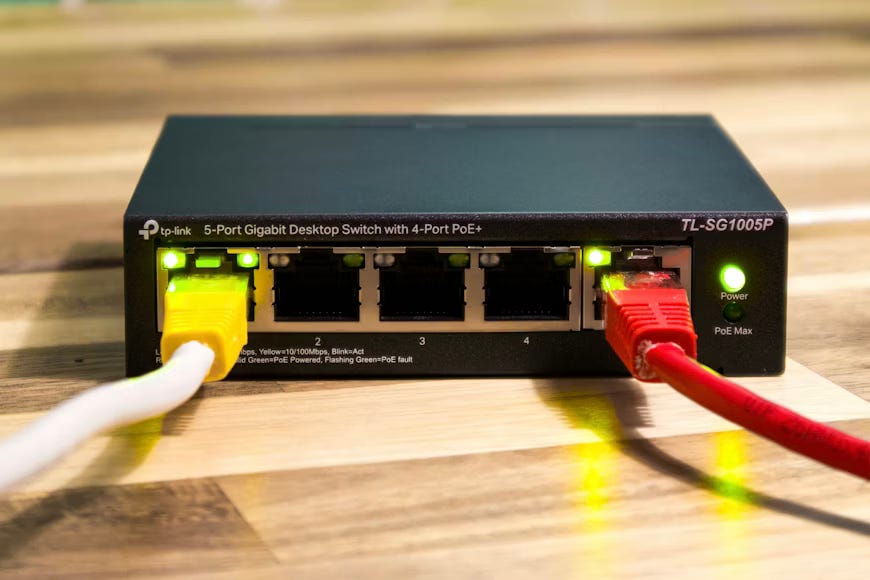
Networking isn’t just something “network admins do.” It’s the invisible layer that connects your code to the real world — from Jenkins agents talking to Git servers, to Kubernetes Pods communicating across clusters. Without core networking knowledge, you’ll debug in circles.
📌 Every DevOps Engineers Must know these Networking concepts :
OSI Model
Protocols : TCP/UDP/IP
Ports
Subnetting
Routing
VPN (Virtual Private Network)
Networking tools
DNS
OSI Model :
OSI Model : The OSI Model is a 7-layer framework that explains how data travels from one computer to another over a network. Each layer has a specific responsibility, which helps in understanding, designing, and troubleshooting networks.
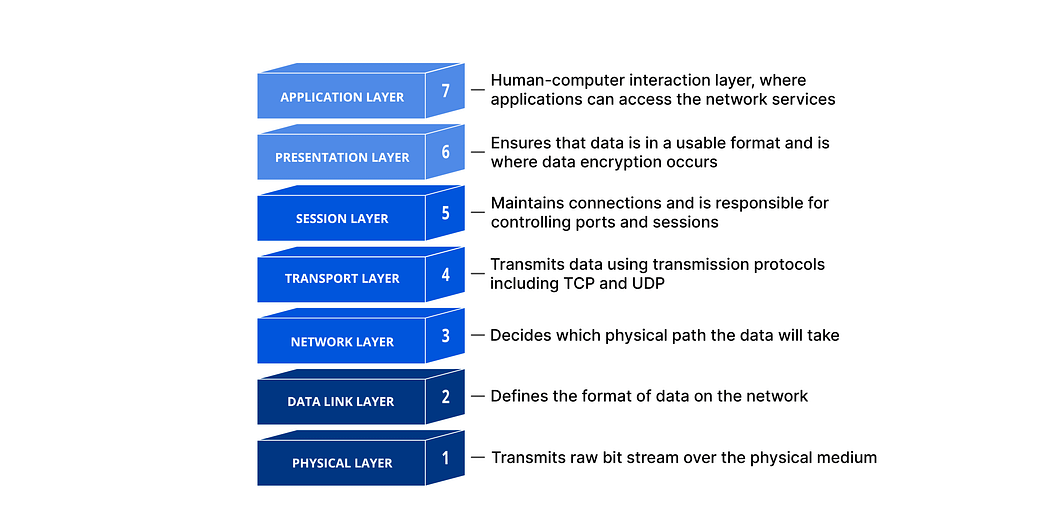
7 Layers (Top to Bottom):
Application — User-facing services like HTTP, FTP, SMTP
Presentation — Data format, encryption, compression
Session — Manages connections (start, maintain, end sessions)
Transport — Reliable delivery using TCP / fast delivery using UDP
Network — Routing and IP addressing**
Data Link** — MAC addressing and error detection
Physical — Cables, switches, electrical signals
In short:
OSI model divides network communication into layers so engineers can understand issues easily and build scalable systems.
Protocols : TCP/UDP/IP
IP (Internet Protocol):
IP is responsible for addressing and routing packets from source to destination. It does not guarantee delivery — only decides where the data should go.
TCP (Transmission Control Protocol):
TCP provides reliable communication. It ensures data is delivered in order, without loss, using acknowledgments and retransmissions. Used where accuracy matters (HTTP, HTTPS, SSH).
UDP (User Datagram Protocol):
UDP provides fast but unreliable communication. It sends data without checking delivery, making it suitable for speed-critical use cases (video streaming, DNS, online gaming).
In short:
IP = Addressing & routing
TCP = Reliable, ordered deliver
UDP = Fast, connectionless delivery
Ports :
A port is a logical communication endpoint that helps a computer identify which application or service should receive the network data.
An IP address identifies the machine, and a port number identifies the application running on that machine.
Here are some common Port Examples:
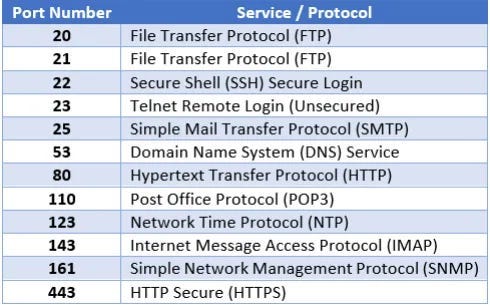
Port Range:
0–1023 → Well-known ports
1024–49151 → Registered ports
49152–65535 → Dynamic/private ports
In short:
Ports allow multiple services to run on the same server using the same IP address without conflict.
Subnetting :
Subnetting is the process of dividing a large network into smaller networks (subnets) to improve performance, security, and management.
Instead of one big network handling all traffic, subnetting splits it into logical groups.
Why Subnetting is used:
1. Reduces network congestion
2.Improves security by isolating traffic
3. Makes IP management easier
4. Helps in efficient use of IP addresses
Example:*
A network 192.168.1.0/24 can be divided into smaller subnets like:192.168.1.0/25 & 192.168.1.128/25*
In short:
Subnetting helps organize networks efficiently by breaking them into smaller, manageable parts.
Routing :
Routing is the process of selecting the best path for data packets to travel from a source network to a destination network.
This task is performed by routers using routing tables and routing protocols.
How routing works : (stages)
Data is sent as packets
Router checks destination IP
Router forwards the packet to the next best network path
Types of Routing:
Static routing — Manually configured routes
Dynamic routing — Routes learned automatically (OSPF, BGP)
In short:
Routing ensures data reaches the correct network efficiently across multiple networks.
VPN:
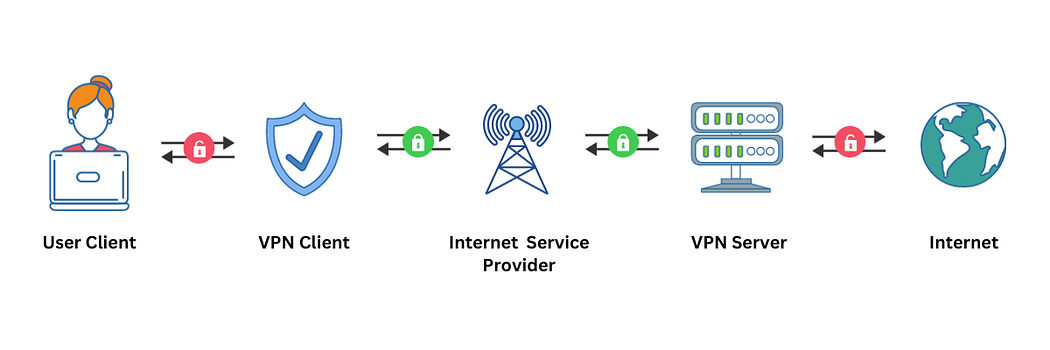
A VPN (Virtual Private Network) creates a secure, encrypted tunnel between your device and a remote network over the internet . VPNs allow professionals to securely connect to remote servers, access cloud resources, and perform maintenance tasks without compromising data security. It ensures a private and encrypted connection, crucial when dealing with sensitive configurations, deployments, or infrastructure management tasks.
DNS :
DNS, or Domain Name System, translates easy-to-remember domain names to computer-friendly IP addresses, helps find mail servers, balances web traffic among servers, redirects requests, performs reverse lookups, and speeds up responses through caching. It’s a vital system that ensures efficient and reliable communication on the internet.
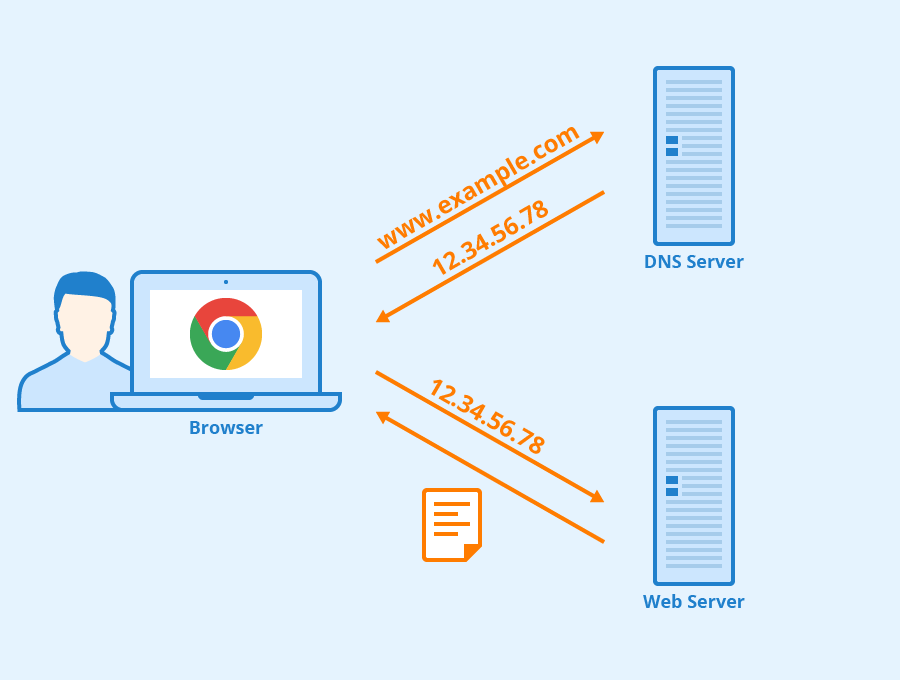
DNS Record Types:
A Record (Address Record): Maps a domain to an IPv4 address.
AAAA Record: Maps a domain to an IPv6 address.
CNAME Record (Canonical Name): Alias of one domain to another.
MX Record (Mail Exchange): Specifies mail servers for the domain.
NS Record (Name Server): Identifies authoritative DNS servers for the domain.
Google IP address: 74.125.68.102
Networking tools :
Networking tools are essential for DevOps engineers to troubleshoot connectivity issues, analyze network performance, and ensure reliable communication between systems. Below are some of the most important tools every DevOps engineer should know.
1. Ping
Purpose:*
Checks whether a host is reachable over an IP network and measures response time.*
Usage Example:
ping google.com
2. Traceroute / Traceroute6
Purpose:*
Displays the path packets take to reach a destination and identifies network delays or failures.*
Usage Example:
traceroute google.com
3. Netstat
Purpose:*
Displays active network connections, routing tables, interface statistics, and listening ports.*
Usage Example:
netstat -a
4. Nmap
Purpose:*
Discovers hosts and services on a network by scanning open ports and detecting running services.*
Usage Example:
nmap -p 1-1000 target
5. Tcpdump
Purpose:*
Captures and analyzes network packets for troubleshooting and debugging.*
Usage Example:
tcpdump -i eth0
6. Ipconfig (Windows) / Ifconfig (Linux)
Purpose:*
Displays network interface configuration details such as IP address, subnet mask, and gateway.*
Usage Example (Linux):
ifconfig
7. Dig (Domain Information Groper)
Purpose:*
Queries DNS servers to retrieve detailed domain and IP information.*
Usage Example:
dig google.com
8. Nslookup (Windows) / Host (Linux)
Purpose:*
Retrieves DNS information for a domain name.*
Usage Example (Linux):
host google.com
9. Wireshark
Purpose:*
A graphical network protocol analyzer used to capture and inspect network traffic in detail.*
Usage Example:
Capture and analyze packets on a selected network interface.
10. Iperf
Purpose:*
Measures network bandwidth and performance for TCP and UDP connections.*
Usage Example:
iperf -s   # Server
iperf -c   # Client
Conclusion
These networking tools are indispensable for DevOps engineers*. They help in* debugging network issues*,* monitoring performance*, and* maintaining stable infrastructure in cloud and on-prem environments.
